19 January 2007

Skimming through 6039 pages of MSOOXML


As a member of SIRIM TC4, I am entrusted to check out any work passing through the committee. The latest of course is the evaluation of the Microsoft Office Open XML (MSOOXML) standard which is being fast-tracked through ISO, which Malaysia has a vote.

So I dutifully downloaded the massive 49MB file from ECMA, and hoped that Adobe Acrobat would not steal too much of my system resources to view the 6039 page file.

The document is huge. Im not too sure how it can be "fast-tracked" because theres just so much to cover. The document is also full of wierd stuff. For example there are over 10 pages with pictures on how to render a 3d "button" with 3 lights and different materials. I didnt know that office document creation was as extensive as a 3D visualisation package.

As I scanned through the document, it became very apparent that there are many things not very consistent with it. Within an hour, I managed to pick up about 5 aspects, and they are quite significant issues regarding the standard.

If you are a techie, I would like to encourage you to have a look at this specification, because it is interesting that such a document could be allowed to be fast-tracked.

Here is my first evaluation of one of the problems with this standard: "MSOOXML has poor XML Element names."

You can also view a growing list of objections at grokdoc.

yk.

19 December 2006

"Technology Neutrality" and what it means to us Malaysians - New Straits Times

My article finally came out in the New Straits Times Online, entitled "Opinion: 'Technology Neutrality' and what it means to us Malaysians". Its quite a direct article in that I didn't hold back in the direct criticisms and that was deliberate because the message has to be quite clear that the terms "Neutrality" should not just mean sit-back-and-dont-do-nufin. It should mean a pro-active approach in software evaluation to ensure that we have a level playing field.

Im just wondering if the New Straits Times would actually have the guts to put this opinion on their print versions, in conjunction with their BSA/CompTIA/Microsoft sponsored 'advertorials' which they so frequently have, often an entire spread with full colour ...

Well, its a continuation of our efforts in getting the communities voice heard in mainstream media, and hopefully we can have more of these in the future.


yk.

7 December 2006

MOSSA!

Today was the position statement of MOSSA, the Malaysian Open Source Alliance. It was wonderful to see vendors, users and organisations come together to show our support for Open Source in Malaysia. Competing vendors like IBM, Novell, Redhat, Sun and Malaysian ISVs like Omnilogic, QubeConnect, OpenSourceSystems, Skali to organisations who represent users like FMM, MNCC and UNDP. This was a truly unique phenomena and it was wonderful to see companies rise beyond their sales struggles to unite for a common cause which was inline with their customers needs.

Dr. Yusseri gave a talk on his experiences in setting up the MAMPU masterplan and how some people decided to concentrate on just one sentence in the 1000+ sentence document and harp on the very hypothetical situation of preference to OSS. He was dissapointed that the very people who were harping on it never really read the document and the main message it was sending out. And that was ironically the true form of technology neutrality.

He said that eventually, all software would be free. The entire stack is going in that direction. Now Operating Systems are pretty much free, productivity apps are decreasing in costs, with very good alternatives available for free, and eventually CMS, ERP and other products will be available in the OSS landscape. All this will happen while incubents will continue to wrange, increase prices and involve themselves in anti-competitive behaviour. And yet OSS is inevitable and will be more of a "no-brainer" sooner if not later.

He was worried that Malaysia's contribution to Open Source projects is still miniscule. The number of contributors vs population is extremely small compared to countries like Australia which has an avid contributor community.

After his talk, there was a enlightening Roundtable talk. Representatives from MOSSA answered questions and discussed issues pertaining to the software market in Malaysia, Piracy, the confusion of Open Source and Standards and Respect for IP.

The result was a true understanding of the term Neutrality and the benefits it can bring to Malaysians with increased Choice, lower costs, and more freedoms.

With it came the position statement of MOSSA, which is available here:

"Position Statement on Software Neutrality and Openness" from MOSSA (Malaysia Open Source Software Alliance)

You are invited to endorse the Position Statement -- you may do so by using the Comments facility at the bottom of this blog post or email us at the address open -AT - openmalaysiablog - DOT - com. Please submit your real name in full, organization, email address, contact number and website (if available).

If you support this position, go ahead and add a comment at openmalaysiablog.com


yk.

24 November 2006

gimme my steel parang.

It would be humourous if it wasnt so sad.

Sounds like Malaysia and Thailand's Technology Ministers are trying to out do each other!

Here's the latest from our very own Ministry of Science, Technology and Innovation:

The minister cited the example of a parang (machete) made from titanium and another made of stainless steel.

"If you believe that you can do more using the titanium parang, then use the titanium parang," he said. And if the stainless steel parang serves you better, you should use that.

"It's about choice. Let the market decide," he added

Anyway, who'd use a titanium parang?

  1. cost would be exhorbitant
  2. shouldn't use a lightweight product to do heavy weight work
  3. maintenance would be a killer
  4. sharpening stones would need to come with guaranteed advantage
  5. Once broken considered gone
  6. Weight distribution will be all wrong
  7. Form over function

All in all, users of titanium parangs tend to be bad hackers anyway.


yk.

20 November 2006

Groklawed!

Woo... One of my posts have been Groklawed.
.... well ... in a very minor way.

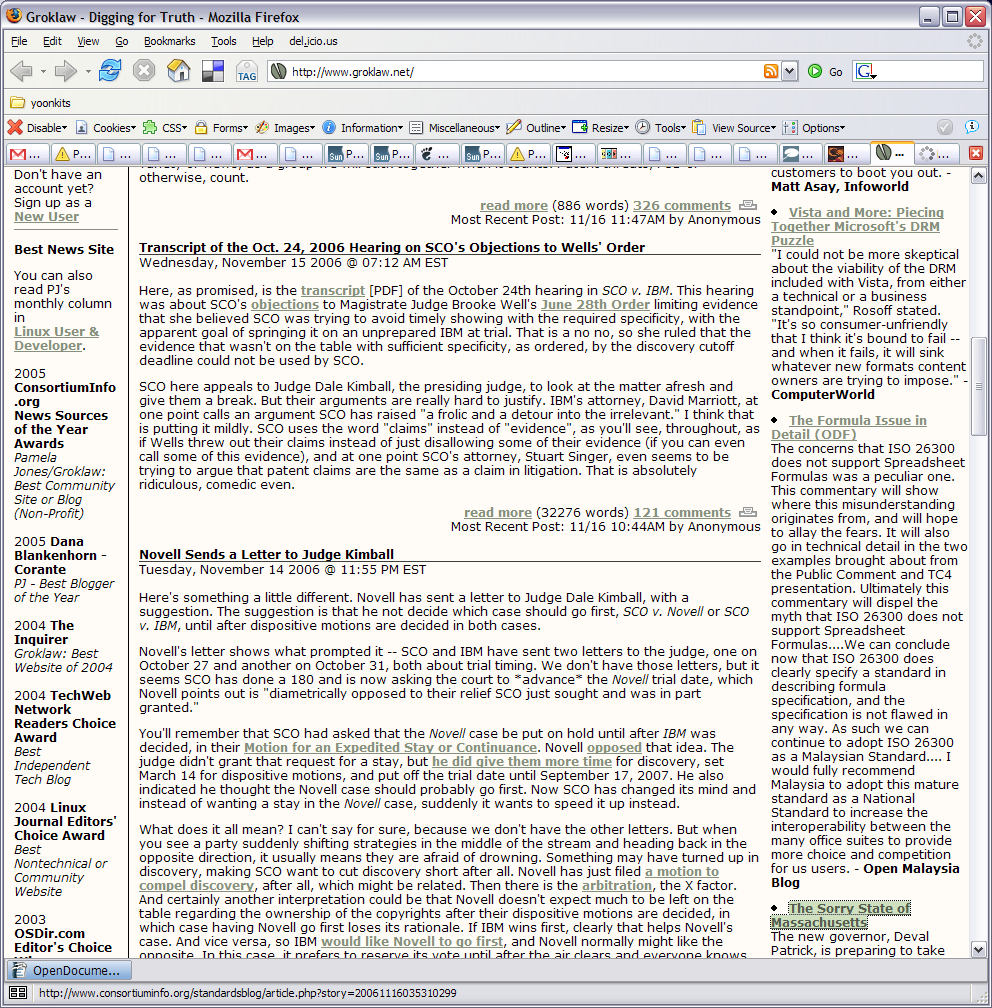
Pamela Jones keeps a roll of interesting 'News Picks' articles on the right hand column of her very popular FOSS Law website, and the one which caught her attention was my commentary in the openmalaysiablog.com site on the concerns regarding Open Formula in the ODF / ISO 26300 specifications which Microsoft Malaysia is harping about.

Im trying to put facts into context and dismiss all the pseudo-concerns (FUD) regarding this issue.

Anyway, here is the screenshot, which Im very proud of:

And here is the article entitled: The Formula Issue in Detail.


yk.

18 October 2006

Upgrading the E61 Firmware

I read with interest the new firmware released by Nokia for the E61. For example:
"I am waiting anxiously to get my hands on the new E61 firmware.
It is currently running 1.0610.04.04 and the new firmware version is 2.618.06.05. As soon as I get a chance to try it, I will post more details here "
This was written in August 18th 2006 on a blog called "All things fony!" which deals with E61 mods and stuff. Quite an interesting site.

To find out what firmware you are running, type in *#0000# in the dialer and immediately the phone should report what versions they are.
1.0610.04.04
19-04-06

RM-89

Nokia E61


So interestingly, mine was still the 1.0* version which is peculiar as I just bought it. Ah well. Fortunately, unlike older Nokia handphones, we dont need 'official' nor 'trained' Nokia 'service personnels' to flash the device to the latest and greatest firmware. For my 7710, I was scammed RM80 to get it flashed at a Dr.Mobiles, and vowed never to do so again. I hoped that the upgrade would make it faster, and have better character recognition. Unfortunately it was the Asian Version, so the upgrades were good for Chinese Character recognition which made my English character recognition even worse.

Anyway, the upgrade process was fortunately relatively simple! Just go to the Nokia Software Update Site, and follow the 5 steps.
  1. Backup Phone Settings (Tools / Mem / Options / Backup)
  2. Download the Windows based Software Updater (16MB)
  3. Install the Software Updater ( I had to install twice - the first attempt rolled back)
  4. Download the latest Firmware - 47.9MB (!!)
  5. Upload the Firmware to the device. It took about 8 minutes to upload the info to the E61, and the progress bar was moving slowly but surely. The device rebooted twice, and the last one showed the NOKIA logo (much to my relief) however it looked lower onscreen than usual.
Upon the restart,
  1. Had to reset the city/time settings
  2. Restore most settings from the memory card backup
  3. Restart the device again.
  4. Type in *#0000#
2.0618.06.05
14-07-06

RM-89

Nokia E61

Updated!

I didnt see much difference, only that the colours of the top two icons (Tx power and Battery indicators) tend to not change when the background fades. Otherwise its suppose to be faster. I guess I didnt have enough time with the old version to tell the difference.

yk.

17 October 2006

Nokia E61 vs Nokia 7710


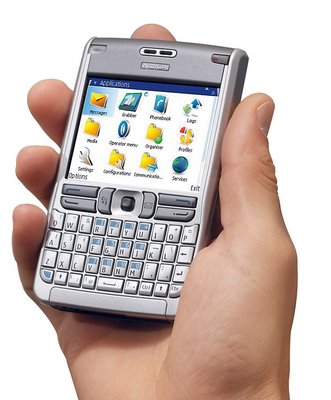
Ive finally moved from my Nokia 7710 and purchased the relatively recent E61.

The main reasons are:
  1. Wifi support - something severely lacking in the 7710
  2. Proper browser - with a better aspect ratio
  3. A proper keyboard - instead of resorting to the onscreen keyboard, after the character recognition on the 7710 got worse (after a firmware 'upgrade')
  4. A whole lot thinner. Fits in the pocket better.
  5. 3G
  6. So much more responsive. The 7710 is lagggggy. It takes 5-10 seconds just to load up an sms. Frustrating! The E61 is fast. Just like the old mono phones of yesteryear.
  7. Other communication features, which I havent gotten round to configure yet: SIP phone, Push-To-Talk, IM, and all these niceties...
what a brick.

What would be missed are
  1. The Camera - the E61 doesnt have one, which is peculiar for a 'modern' phone, but I guess it brings weight and costs down
  2. A good Alarm Clock - the E61's alarm clock is primitive. Just set the time, and it rings and dissapears. The 7710 has some great functionality like only ringing on weekdays, scheduling multiple alarms. It was well thought out.
  3. Power socket is smaller than the normal Nokia plugs. This will be a nuinsance especially at remote locations when batteries are low and the device needs recharging. The package comes with a proper charger, and a adapter for the plug, but its such a hassle. I also dont understand why Nokia phones can't charge via the USB connector cable provided.
  4. Boomier Bass - The 7710's speakers are huge. The E61 is not too bad either, but doesnt quite compare with its older bro.

Besides the great communication features E61 offers, it the really tactile keyboard which I like. Its reminicent of an old HP 4350 I used before about 2 years ago.

The problem with that model was that it was just a iPaq, with no phone features. It had Wifi and Bluetooth, but it really needed to have a decent phone.

I guess it takes the 3 years since before we have something like the E61.

Ive been using the E61 for three days now, and Im really happy with the build quality. Its light, but it doesnt feel that plasticky. Most things are customisable. There are also quite a few annoyances which I will definitely rant about one of these days.

The default screen protector is still on, you'd just have to pick out the corner foil, and it should stay on. Dinesh had his on for quite a while, which looked dreadful. When the time comes Ill replace it with a better one, as I hope he has done.


yk.

12 October 2006

Things that make me go *sigh* for Malaysia.

Reading the papers nowadays is depressing at worst or sadly humourous at best. It takes alot of effort to see that anything good can come out of it all.

The first of course was the case of the MP who asked Customs to 'Close one Eye' on his alleged illegal imports of timber. That alone was a huge farce, but the complications related to that event in the towing the party line of the Backbenchers club ,and the subsequent resignation of the president showed that the wrong person suffered. Subsequently the One-eyed MP goes on with business as usual, committing other wrongs while going off scot free.

Then the Article 11 issues, where good intentions of debating pertinent issues in a civilised manner was disrupted by unruly people. Instead of arresting the rioters, the organisors were persecuted. And the subsequent gag order in the pretense of maintain blah blah stability was issued. Again, the wrong persons became the victims.

Next up, the asli report on corporate equity distribution. Whether or not the model proposed is right, does not deserve the damning accusation that the report is 'rubbish'. The document seems well researched with facts to balance, and it is open for all to review. Versus the 'closed document', it doesnt seem 'rubbish' to me. Because of this report which was published 8 months ago (Feb '06) asli was politically pressured to retract the figures, now the good Dr. has to resign. Again, the wrong person was persecuted for no apparent wrong doing.

The new thing is the case of the Fraudulent APs where it is alleged that a Senator's son was selling fraud APs. The Senator has the gall to state in newspapers that his son was stupid, and should have been more discrete in the fraud. Perhaps his quotes was out of context, but it sure doesn't sound like this Senator wholeheartedly disproves of his son's act!

Its darn frustrating that people like these are running our country.

Things do make things right again:
  1. Transparency. Opaque procedures like APs and Govt docs should be documented and published.
  2. Zero tolerance for corruption. MPs and Senators should resign (and not their critics) if they find themselves in controversy
  3. Knowlege-based workforce. Studies like asli should be encouraged and not persecuted.
  4. Multi-culturalism and Understanding. More dialogues should be held instead of gagged.
And then we have the haze, but that, we can't do much about.


yk.

12 September 2006

Panic: Temporary File Seek

Administrating users emails is a bore. Some are packrats and just keep their emails forever. A quick look at the /var/spool/mail/ directory will show just how much emails are stored.

Yesterday there was a user who sent out an email with a large 17MB power point file to EVERYONE. Three times. This caused uptimes to soar and made people frustrated that their emails were delivered slow if at all. So we had to clean them up.

# mail -u lewser.
fseek: Invalid argument
panic: temporary file seek
Aborted
# |

What? we started panicking. File system corruption? Our RAID failed? Need a reboot? Mailbox dead? We tried it on other users with large mailboxes with the same error!

***panic*panic*panic***

We decided to take a breather and do some research before we rip apart our mailserver.
Googling gave us a hint: use mutt.

#mutt -f lewser

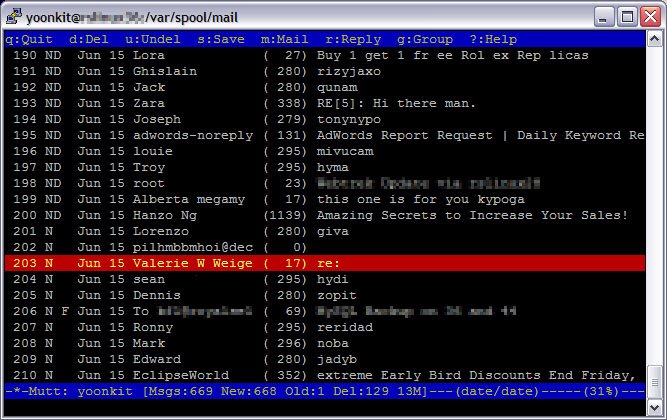
and I was pleasantly surprised with a console app that looked like this:

spam riddled email user.

It successfully opened the mail, allowed me to navigate to the bottom really quickly (PgDn), and interactively delete the email (d), feedbacked to me whenever it was opening or closing a file. No silly fseek problems. What a life-saver.

So why doesnt mail support large mailboxes? I have no idea.
Why doesnt it provide a more 'soothing' error message instead of sending us into panic mode? I dont know.
Will I use 'mail -u' ever again? Not if I can help it.

The Mutt is truly Man's Best Friend.


yk.

10 September 2006

PopTop - PPTP Windows VPN on a Linux Server

Our old PPTP server finally died last week.

It was an old Windows NT (!!!) server, and we were just wondering how long it would take before it got taken down. Well, it finally got found, and was subsequently infected with numerous viruses by the script kiddies out there. Comparitively, it lasted long enough, a good 8 years plus, so it had a good run!

We got rid of the viruses, and put it back on, and within a day, it got infected again.

Fortunately we dont have anything important running on it, most of our VPN requirements have been converted to IPSec. However is a small number of users who do want to connect from home, via the very convenient PPTP connections on their Windows machines. Very easy to set up and run. Not a crucial requirement, but nice to have...

So we decided to try PopTop.
"Using Poptop, Linux servers can now function seamlessly in a PPTP VPN environment. This enables administrators to leverage the considerable benefits of both Microsoft and Linux operating systems."
Setting this up was relatively easy. I followed the online instructions as described here: Redhat-howto. However there were problems.

At first the WinXP client would not connect to the server. Upon checking, I found out that the firewall was enabled on the server. So we opened up port 1723 for PPTP.

Then the WinXP client connected, but complained about the server not supporting certificates; either 40bit or 128bit encryption. My fault, didnt set the options.pptp file correctly with require-mschap-v2 and require-mppe-128 as options.

I used the webmin-PPTP-Server to do the administration (comes standard with webmin), and it was pretty much full featured except that it didnt have a section to define the MS-DNS and MS-WINS options as in the options.pptp file. Not a major problem; vi helped.

Its hard to debug the connection. Somehow I never got to ping the PPTP server when connected. So for a good 3 hours I was trying to find out what was wrong, and making sure that the routes are correct. Its annoying because a 'route print' nor a 'ipconfig' on the WinXP doesnt provide any useful information regarding the VPN setup.

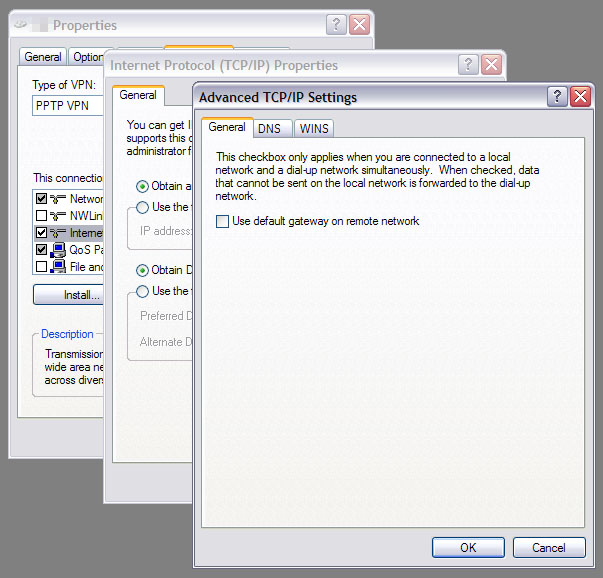
And then finally I found this nugget of information: 'deselect "Use default gateway on remote network"' I tried it, and mysteriously it worked.
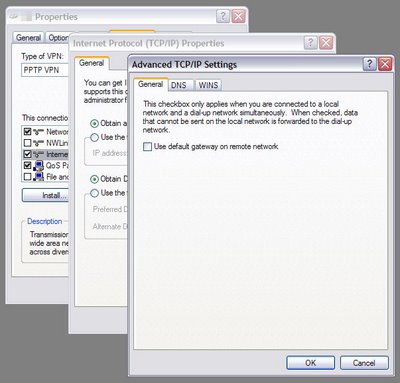
It took me longer that I anticipated to set up the server, however it was not because of the server setup, rather it was an obscure setting on the client to get it to work.

So now we have completely replaced the unsupported, defunct, aging, crackable Windows NT with a shiny new Fedora Core 5 server running PopTop. Users just have to make a small adjustment to their client setting to reconnect. I have since brought up the firewall to only allow certain traffic to flow through this connection to prevent future cracks.

Its amazing what FOSS can do for you.

yk.

30 August 2006

Ubuntu "Dapper Drake" LTS v6.06

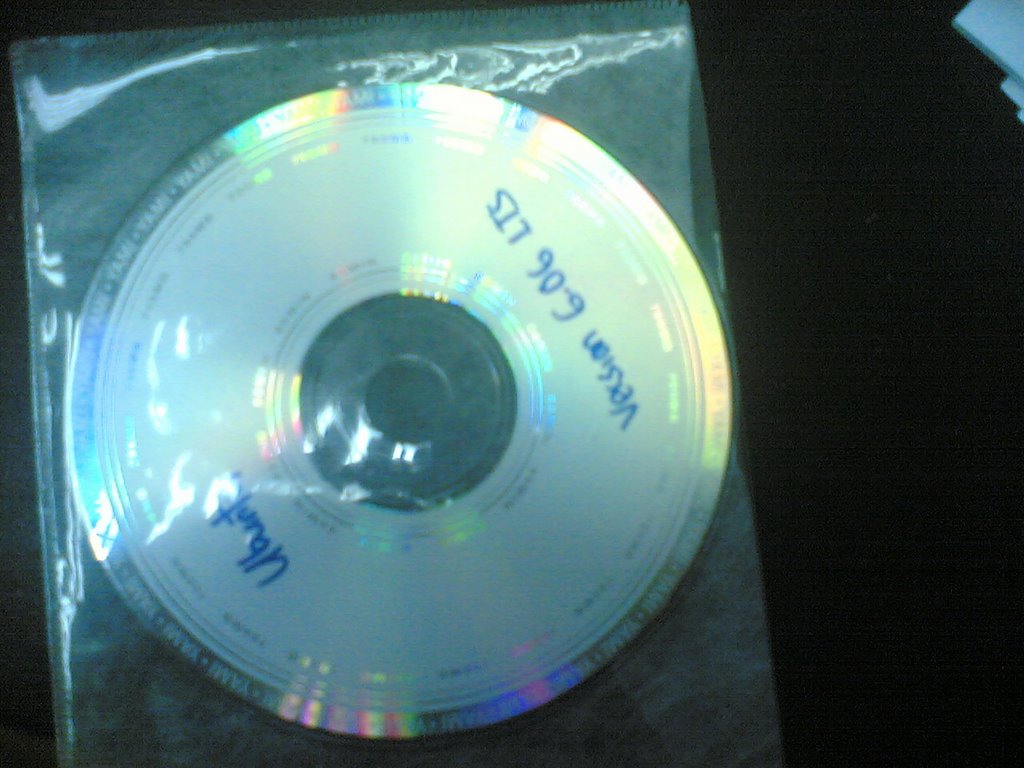
I got a copy of Ubuntu from Aizat at the myoss stall at the PC Fair. Unfortunately it got me puzzled, as my laptop didn't recognise the disc as a bootable one. So it looked like a dud disk. However the content is OK, in that its viewable. So my only guess is that the person who prepared it mounted the ISO image and burnt the CD from the contents, and not the ISO directly. Ive seen this happen before, even by some computer experts. So if you happen to have this disc from the PC Fair, please throw it away and get a proper one.


I managed to get a bootable Ubuntu, and tried installing it on my laptop. Its a Compaq Presario x1407, which sports a widescreen 1600x1050 res. This gave X alot of problems in that my resolutions are not standard, and I often have to manually edit the config files just to get the settings right.

So I was rather pleasantly surprised when Ubuntu booted up into its glorious GUI and detected my display correctly. Its wonderful that these live installers allow the user to test drive the desktop before installing. Isn't it novel that linux can do that? "Try me, if you like me, install me". So I did. I clicked on the little icon, the only one available on the top right and proceeded to install Ubuntu, for the first time.

There were quite a few quirks with the Ubuntu installer, and I will list the few here in my notes during the installation.
  1. The time was wierd. After setting my timezone to KL, (which was on the map, fortunately) it added 7 hours to my system clock. This is wierd because my other OSs are ok with it. So I just went with it and readjusted the clock back 7 hours.
  2. The Keyboard selection was unique, it even has a text entry to try out the keys. However the screen on the right was conspicuously blank, which really show show a bitmap/SVG of the keyboards selected. The ability to support multi-languages out of the box is a real plus.
  3. The Disc Partitioner is slightly obscure. I have a 5GB partition which I leave for testing out OSes (the previous was linspire). I couldn't for the life of me figure out how to 'flag' which partition to install Ubuntu's root to. So I just deleted the linspire partition, and recreated it as ext3 with the option to format it. After clicking 'Next' it becomes obvious on how to set the partitions for installation, where we define the mount points. However it wasnt obvious when it mattered.
  4. It was great that it recognises all my partitions immediately and offers to mount all of them, including NTFS and FAT32s. My fedora 5 install requires me to jump through hoops for NTFS support.
  5. However the installer should show what the filetypes are to help us define the mountpoints. It would be great to have the graphic of the partitions displayed too.
  6. It took a mere 15 minutes to copy the gist of Ubuntu into the HDD. In the meantime, I could play all the games supplied in the GUI, and even browse the 'net as TCPIP was correctly configured. Thats quite a nice touch, and it beats Fedora's Anaconda which takes up the entire screen, or Window's text based installer.
  7. There were some issues with the GUI widgets: buttons started changing colours and only reverted on mouseover or when clicked and other oddities.
  8. So after the copying, I rebooted. Only to be greeted by a new grub, with WinXP correctly identified as a boot option. The cute drums upon login is a nice touch.
  9. 'sudo -i' is the means of getting the root shell. Use the users password, not roots.
  10. To get mp3 and all the other 'patented' goodies to work under Ubuntu, its relatively easy... in synaptic, select the 'Universe' and 'Multiverse' repos and reload the package info. Then install gstreamer and all the other stuff as described in this HowTo.
  11. One great thing is that Hibernate works out of the box! I assigned the power button to Hibernate, and after about 20 seconds, the computer shuts down. Starting up and resuming work would take about 50 seconds. Im not complaining, cos I never got it to work before.
  12. I added the Weather applet on the gnome panel. Unfortunately 'Kuala Lumpur' still is NOT an option under 'Asia/Malaysia'! The closest city is Subang, so I selected that.
  13. At home, the Wifi worked out well.
So its just been a few days of playing with this distro, and I must say, Im very impressed with it. Just one CD, and its quite a nice desktop, with all the apps to make it functional. The 'interactive' install is a definite bonus. I now know why this distro has so many fans and understand why it has grown so popular that quickly.

Well done to the guys at Canonical!

yk.

29 August 2006

The Office Values

There's this fantastic set of videos on Google Video on Microsofts' new training video, written and performed by Ricky Gervais and Stephen Merchant, with Ricky reprising his role as David Brent from the originial BBC 'The Office' Series.

Its really fantastic.

Here is Part 1:


And Part 2:


To illustrate his crazy monologues, David Brent goes on to describe Microsoft's core value: "Maintaining and being informed by our passion for customers for the technology."

"... so Im selling this thing
'Can I buy this brilliant piece of technology?'
'Yes you can, you little four eyed freak. Its 400 quid. Now get out of the shop you're making the place look untidy!'

Its just as bad the other way 'round. Just as bad. Ive no passion for the technology 'eww made this right'
Im in the shop I love the customer though...
You walk in,
'Your glasses look nice, love your hair, You like this, do you? Its rubbish, it dont work, and its full of viruses, but I love you...'

Pointless!"

Heheh... Lots of fantastic misunderstandings as only David Brent can do. e.g. Stephen Hawking thinking too much will cause you to become half man half machine. His misplaced respect for Nelson Mandela for not getting convicted again is particularly funny.

At the end of each episode, theres a really good Blooper reel. His laughter is quite infectious, so watch out.

If you like this type of humour, watch 'The Office' Season 1 and 2, and the Xmas Special (a must). Then try to listen to the Guardian Unlimited 'Ricky Gervaise Show' podcasts Season 1 and 2 featuring Karl Pilkington, who 'plays' the part of the village idiot. Really fantastic stuff.


More information at rickygervais.com.


yk.