Showing posts with label firefox. Show all posts

2 February 2008

Asus eeePC, ubuntu, firefox and the synaptic touchpad

Im playing around with the Asus eeePC and have since tried out different linux flavours on it. Ive settled with Ubuntu mainly because of familiarity. And after a reinstall, its fast enough.

A surprising discovery is that the synaptics touchpad features horizontal scrolling too. To enable it,

1) Go to System / Preference / Mouse
2) Click the "Touchpad" tab
3) Enable "Horizontal Scrolling"

Firefox will then become impossible to use, because the horizontal action is defaulted to "back" and "forward". So just like the Mighty Mouse settings, adjust these about:config settings:

4) mousewheel.horizscroll.withnokey.action from "2" to "0"
5) mousewheel.horizscroll.withnokey.numlines from "-1" to "1"

And there you have it, vertical and horizontal scrolling on the little eeePC.

My thoughts on this device in a later post.

yk

24 February 2007

Firefox and IPv6

Just installed Ubuntu 6.10 in my laptop for fun. Installation was a breeze, although it refused to install on the partition I wanted it to. It just kept complaining that I hadn't defined the root mount point, when I obviously did. However when chosing another partition, it went on OK. So I still have Ubuntu 6.06 in my Hard drive.

I had a strange problem browsing the internet. Firefox refused to work, giving me a "connection timeout" on every website. Ping and dns resolved ok via the command line. Even more peculiar, Konqueror worked as well. So, did a google for a solution, and managed to find this:

linuxquestions.org

of which it states:
"Try turning off IPv6 in Firefox. For some reason that tends to fix problems with Yahoo.

Type 'about:config' in the address bar and look for 'network.dns.disableIPv6' and toggle it to true"

Did that, restarted Firefox, and voila, it worked.


yk.

12 February 2007

Firefox 2.0 - the upgrade

Ive finally upgraded to Firefox 2.0. The reason why I hadn't done earlier was because I was very happy with my setup with Firefox 1.5, and didnt really want to mess around with more settings and other twiddly things. I dont have time for that.

However I saw my colleague doing a search and I was impressed with the fact that it finally searches within text areas! Previously when I was updating large text files in webmin like httpd.conf or the aliases file, I had to Ctrl-A Ctrl-C (copy all) and Ctrl-V (paste) it into Notepad++ before I can do some proper searching and text editing.

Firefox 2's new spell checker is a bonus too. The dotted red lines are far less obtrusive than regular word processors wiggly red lines. Its nice.

What I didnt like about Firefox 2 was the way it displayed the tabs. Unlike Firefox 1.5, it would keep the width of the tabs and scroll new tabs along. This is unnecessary usage of screen real estate, and the individual close (x) buttons are either very hard to hit when you need them, or extremely easy to click on when you dont expect it to.

So here's how to change it to a better behaviour. Type in "about:config" in the URL bar. You should see something like this:
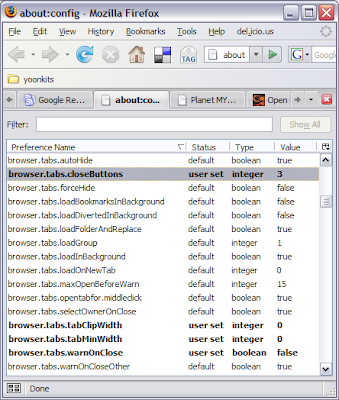
To change the close tab buttons to appear on the right hand side as in Firefox 1.5, change
browser.tabs.closeButtons = 3

To make sure that the tabs shrink to fit, change this:
browser.tabs.tabClipWidth = 0
browser.tabs.tabMinWidth = 0

Firefox 2.0's tab behavior would be close to what 1.5 handled them. Add-ons like "mouse gestures" and "Free Download Manager" was automatically upgraded and installed.

So far, no hassles.


yk.