Showing posts with label e61. Show all posts

24 May 2007

Ubuntu dialup via bluetooth

After using Feisty Fawn, Ubuntu v7.04 for close to a month now, Im happy to report that things are going extremly well. Latest task was to get my e61 to work with my computer so that I can dial up to the internet whenever I dont have access to a wifi spot or wired connectivity.

I have been using a CNet CBD-021 device for over a year now, and it has some nifty tools for Windows XP, with a nice UI "BlueSoleil" which displays connected and available bluetooth devices around the computer. It also provides point and clicky access to file transfers and dial up networking.

However in the Linux world, no such niceities are provided. We have to do things ourselves, unfortunately. So heres what I had to do to get Laptop -> Bluetooth dongle -> Nokia E61 -> Maxis internet connectivity going.

First step is to get bluetooth working. Plug the Bluetooth dongle into your machine. The dmesg should read something like this:
# dmesg
[ 9383.380000] usb 3-1: new full speed USB device using uhci_hcd and address 2
[ 9383.548000] usb 3-1: configuration #1 chosen from 1 choice
[ 9384.356000] Bluetooth: HCI USB driver ver 2.9


This wiki entry for Ubuntu is extremely useful: "Bluetooth Setup" Basically make sure that bluetooth tools are installed:
# apt-get install bluez-utils ppp
# hcitool scan
[Update: 080211 yky: bluez-pin is not required anymore ]

The output I get from this is: 00:12:D1:6C:8F:10 Yk's phone

I set the computer bluetooth key using the bluez-pin utility

I then paired up my phone with my laptop via the e61 interface. Menu / Connectivity / Bluetooth / Paired Devices, exchanging a numeric key to complete the step.

To make your phone a modem, you will need to define it as a rfcomm device. To do so;

# sdptool browse 00:12:D1:6C:8F:11

of which a whole list of services will be displayed. The one of importance is

Service Name: Dial-Up Networking
Service RecHandle: 0x10013
Service Class ID List:
"Dialup Networking" (0x1103)
Protocol Descriptor List:
"L2CAP" (0x0100)
"RFCOMM" (0x0003)
Channel: 2
Language Base Attr List:
code_ISO639: 0x454e
encoding: 0x6a
base_offset: 0x100
Profile Descriptor List:
"Dialup Networking" (0x1103)
Version: 0x0100

Highlighted is the Channel number, and for my case, its #2. So edit the /etc/bluetooth/rfcomm.conf file

rfcomm0 {
bind yes;
device 00:12:D1:6C:8F:10;
channel 2;
comment "Yk's phone";
}

This means that everytime bluetooth is enabled and your phone is detected, a modem device will be created and accessible as /dev/rfcomm0

[Update: 080211 yky: You will now need to restart the bluetooth service with a /etc/init.d/bluetooth restart for the rfcomm0 device file to appear]

The next step is to configure wvdial. This blogpost has some information "pairing bluetooth modem di feisty fawn" Fortunately I can read Indonesian. To configure wvdial to dialup to maxis, the configuration for /etc/wvdial.conf is:


[Dialer Defaults]
Phone = *99#

Username = maxis

Password = wap

New PPPD = yes
Dial Command = ATDT
[Dialer E61]
Modem = /dev/rfcomm0
Baud = 460800

Dial Command = ATDT

Init2 = ATZ

Init3 = ATM0

Init4 = AT+CGDCONT=1,"IP","unet"

FlowControl = crtscts
Modem Type = Analog Modem


Note the Init4, username, password and phone number have been modified, as described in "Using a phone as a modem" from maxis themselves.

You should now be able to dial into maxis by typing:

# wvdial E61
--> WvDial: Internet dialer version 1.56
--> Cannot get information for serial port.

--> Initializing modem.

--> Sending: ATZ ATZ OK
--> Sending: ATM0
ATM0 OK
--> Sending: AT+CGDCONT=1,"IP","unet"
AT+CGDCONT=1,"IP","unet" OK
--> Modem initialized.

--> Sending: ATDT*99#

--> Waiting for carrier.
ATDT*99# CONNECT
~[7f]}#@!}!} } }2}#}$@#}!}$}%\}"}&} }*} } g}%~
--> Carrier detected. Waiting for prompt.

~[7f]}#@!}!} } }2}#}$@#}!}$}%\}"}&} }*} } g}%~
--> PPP negotiation detected.
--> Starting pppd at Thu May 24 16:37:43 2007

--> Pid of pppd: 30491
--> Using interface ppp0
--> local IP address 58.71.246.115

--> remote IP address 10.6.6.6
--> primary DNS address 10.213.17.1

--> secondary DNS address 10.213.17.2


Unplug your cables, shutdown your Wifi, check your route tables. Confirm to yourself that your internet access is being provided by your phone. Rejoice.


yk.

15 February 2007

Nokia E61 knocked out

My E61 died when I was retrieving some emails. So "Messaging" had stopped working. Accessing this app would flicker the screen, and return to the "Standby" menu. This meant that I could not access my POP accounts for work and GMail, but more importantly, I could not open the "Inbox" for SMSes!

So I tried the usual reboots, shaking, taking the battery out and counting to 10, praying to the Nordic gods ... to no avail.

Finally, out of options, I decided to wipe the sucka. Coincidentally, there was a firmware upgrade, so I had to download the new version of the Nokia Software Updater (21MB), and then download the new firmware (48MB) for the E61.

So since the last upgrade, this new version at 3.0633.09.04 definitely feels faster. Ive also discovered more blogs which just go on and on about these Nokia phones: E-Series which discuss the hardware, and Symbianv3 which highlights new software. The improvements for the new upgrade is detailed here, some of which are quite nice.

After using it for the past 12 hours, I have found that the data network stability is significantly better. Both for 3G/GPRS and WiFi. Previously while using the browser on the couch at home, the signal would drop just because I moved my arm. Now, browsing or downloading POP email is very consistent.

I made a backup prior to the upgrade, but when I restored the data, the same problem of "Messages" not available recurred. So I had to reset the phone by typing in *#7370# with the default password of "1234". This wipes the memory fresh. But it also meant that I had to restart configuring the device all over again. I wonder if its possible to just "Restore" the calendar and contacts from the backups without the other settings?

Oh yes. The settings for POP3 for GMail is:
Connection Settings / Incoming Email:
User name: [username]@googlemail.com # note its, googlemail, not gmail.
Password: [password]
Incoming mail serv.: pop.googlemail.com
Access point in use: Maxis WAP 3G # or whatever. I have a group.
Mailbox name: gmail
Mailbox type: POP3
Security (ports): SSL/TLS
Port: Default
APOP secure login: Off
Connection Settings / Outgoing Email:
My email address: [username]@gmail.com
User name:
[username]@gmail.com # note, its gmail, and not googlemail as in incoming!
Password: [password]
Outgoing mail serv.: smtp.gmail.com # note, its gmail.com and NOT googlemail.com
Security (ports): SSL/TLS
Port: Default
User Settings:
My name: [full name]
Send message: Immediately
Send copy to self: Yes
Include signature: No
New e-mail alerts: On
Reply-to: Off
Delete e-mails from: Phone and server #doesnt really remove nor archive from server
Retrieval Settings:
E-mail to retrieve: Msgs. & attachs.
Retrieval amount: All # this is IMPORTANT. If you select 30 new ones, then the mailbox will erase itself and only display the new emails.

Took me a while to get this setting right... its not obvious.


yk.

18 October 2006

Upgrading the E61 Firmware

I read with interest the new firmware released by Nokia for the E61. For example:
"I am waiting anxiously to get my hands on the new E61 firmware.
It is currently running 1.0610.04.04 and the new firmware version is 2.618.06.05. As soon as I get a chance to try it, I will post more details here "
This was written in August 18th 2006 on a blog called "All things fony!" which deals with E61 mods and stuff. Quite an interesting site.

To find out what firmware you are running, type in *#0000# in the dialer and immediately the phone should report what versions they are.
1.0610.04.04
19-04-06

RM-89

Nokia E61


So interestingly, mine was still the 1.0* version which is peculiar as I just bought it. Ah well. Fortunately, unlike older Nokia handphones, we dont need 'official' nor 'trained' Nokia 'service personnels' to flash the device to the latest and greatest firmware. For my 7710, I was scammed RM80 to get it flashed at a Dr.Mobiles, and vowed never to do so again. I hoped that the upgrade would make it faster, and have better character recognition. Unfortunately it was the Asian Version, so the upgrades were good for Chinese Character recognition which made my English character recognition even worse.

Anyway, the upgrade process was fortunately relatively simple! Just go to the Nokia Software Update Site, and follow the 5 steps.
  1. Backup Phone Settings (Tools / Mem / Options / Backup)
  2. Download the Windows based Software Updater (16MB)
  3. Install the Software Updater ( I had to install twice - the first attempt rolled back)
  4. Download the latest Firmware - 47.9MB (!!)
  5. Upload the Firmware to the device. It took about 8 minutes to upload the info to the E61, and the progress bar was moving slowly but surely. The device rebooted twice, and the last one showed the NOKIA logo (much to my relief) however it looked lower onscreen than usual.
Upon the restart,
  1. Had to reset the city/time settings
  2. Restore most settings from the memory card backup
  3. Restart the device again.
  4. Type in *#0000#
2.0618.06.05
14-07-06

RM-89

Nokia E61

Updated!

I didnt see much difference, only that the colours of the top two icons (Tx power and Battery indicators) tend to not change when the background fades. Otherwise its suppose to be faster. I guess I didnt have enough time with the old version to tell the difference.

yk.

17 October 2006

Nokia E61 vs Nokia 7710


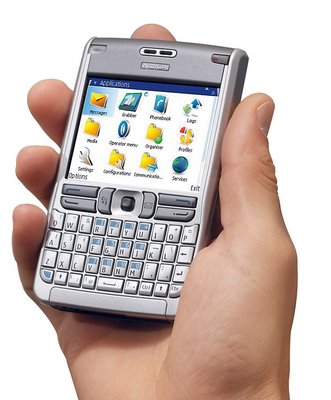
Ive finally moved from my Nokia 7710 and purchased the relatively recent E61.

The main reasons are:
  1. Wifi support - something severely lacking in the 7710
  2. Proper browser - with a better aspect ratio
  3. A proper keyboard - instead of resorting to the onscreen keyboard, after the character recognition on the 7710 got worse (after a firmware 'upgrade')
  4. A whole lot thinner. Fits in the pocket better.
  5. 3G
  6. So much more responsive. The 7710 is lagggggy. It takes 5-10 seconds just to load up an sms. Frustrating! The E61 is fast. Just like the old mono phones of yesteryear.
  7. Other communication features, which I havent gotten round to configure yet: SIP phone, Push-To-Talk, IM, and all these niceties...
what a brick.

What would be missed are
  1. The Camera - the E61 doesnt have one, which is peculiar for a 'modern' phone, but I guess it brings weight and costs down
  2. A good Alarm Clock - the E61's alarm clock is primitive. Just set the time, and it rings and dissapears. The 7710 has some great functionality like only ringing on weekdays, scheduling multiple alarms. It was well thought out.
  3. Power socket is smaller than the normal Nokia plugs. This will be a nuinsance especially at remote locations when batteries are low and the device needs recharging. The package comes with a proper charger, and a adapter for the plug, but its such a hassle. I also dont understand why Nokia phones can't charge via the USB connector cable provided.
  4. Boomier Bass - The 7710's speakers are huge. The E61 is not too bad either, but doesnt quite compare with its older bro.

Besides the great communication features E61 offers, it the really tactile keyboard which I like. Its reminicent of an old HP 4350 I used before about 2 years ago.

The problem with that model was that it was just a iPaq, with no phone features. It had Wifi and Bluetooth, but it really needed to have a decent phone.

I guess it takes the 3 years since before we have something like the E61.

Ive been using the E61 for three days now, and Im really happy with the build quality. Its light, but it doesnt feel that plasticky. Most things are customisable. There are also quite a few annoyances which I will definitely rant about one of these days.

The default screen protector is still on, you'd just have to pick out the corner foil, and it should stay on. Dinesh had his on for quite a while, which looked dreadful. When the time comes Ill replace it with a better one, as I hope he has done.


yk.